Projects
Projects organize the resources required to build and run applications in DigitalSuite and manage the applications' lifecycle. For performing its tasks and providing its user interface, each application is composed of one or more projects. One of the projects is the main project with the application's basic logic.
A project may include subprojects which are imported to it. Using subprojects reduces a project's complexity and enables the reuse of projects. The lifecycle and access rights of a subproject may differ from those of the parent project. This enables customers to build a highly refined lifecycle and access control system.
A project may be dedicated to a specific application or be used by multiple ones.
Project Identification
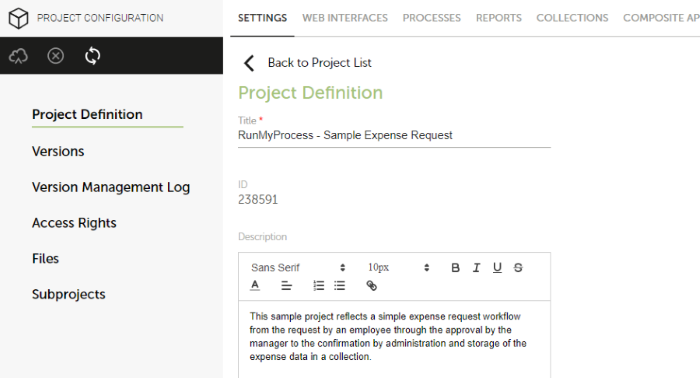
The following settings identify a project in DigitalSuite:
- Name: The name of the project, also referred to as the title.
- ID: A generated number used to uniquely identify the project.
- Description: A short description of the project and its purpose.
The names of projects, which are dedicated to specific applications, should include the application's name as a prefix. As a suffix, a specific purpose, role, set of rights, or type of version, should be used.
Example:
| Item | Name |
|---|---|
| Application | RunMyProcess - Sample Expense Request |
| Main Project | RunMyProcess - Sample Expense Request - MAIN |
| Projects with specific purpose, roles, or rights | RunMyProcess - Sample Expense Request - Administration RunMyProcess - Sample Expense Request - Manager |
| Projects with specific type of versioning | RunMyProcess - Sample Expense Request - Connectors KU: This project contains all the providers and connectors used to integrate the Sample Expense Request application with third-party systems. The KU suffix indicates a specific versioning setting (keep updated) that has been activated for project. |
The names of projects which are used across applications should indicate the purpose, for example, Mail Provider.
Project Vault
The project vault is a secure space where customers can store sensitive information related to a project, such as credentials required for authentication with service providers.
Each project has its own vault. It can contain JSON objects of any nature, which are created and maintained using APIs. The vault is secured by encryption and subject to access control.
Project Setup
In this section, you will learn how to set up the project for your application.
Setting up a Project
A project is the starting point for building an application and organizing the resources related to it. To set up a project, proceed as follows:
- Navigate to the Projects module.
-
Click New Project.
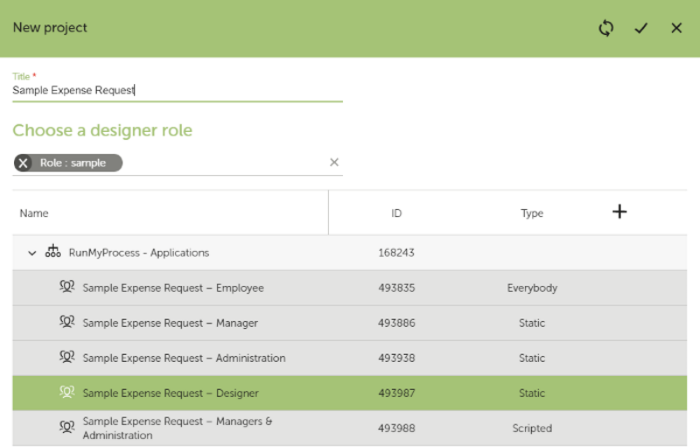
Enter a Title for the project. The title should clearly reflect the application’s purpose.
-
Assign an initial Designer role to the project from the available organization. All users with this role will be authorized to work on the project. The role gives them Designer access rights to all project resources. The organization and roles have been created in the previous step. For more details, refer to Users and Roles.
Configuring a Project
For all configuration settings of a project, you use the Project Configuration module of DigitalSuite Studio. It provides you with direct access to:
- Project resources
- Project versions and execution modes
- Project access rights
- Attached files
- Subprojects
For details, refer to Project Configuration.
Sample Application
The project setup of the sample application includes the following:
- The project is named Sample Expense Request, which is also the name of the application in this case.
- The Sample Expense Request – Designer user role from the Sample Applications organization serves as the initial Designer role for the project.
The following image shows the basic settings of the sample: