DigitalSuite Studio My Settings
My Settings is the DigitalSuite Studio module for managing your DigitalSuite user account. It allows the logged-in user to view and change all account-related settings.
Like all DigitalSuite Studio modules, My Settings provides in-built, toggleable on-screen help to ensure that assistance is instantly available at the point of need.
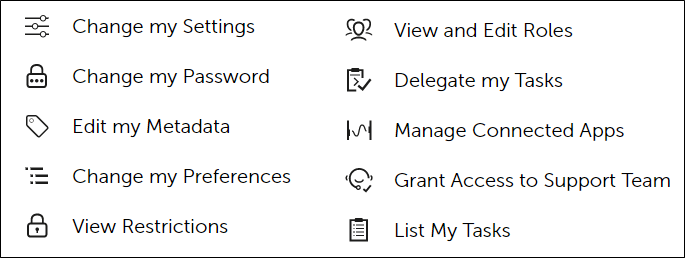
The settings you can manage are categorized as shown in the diagram. Each option is described in detail in the following sections.
-
Change my Settings
Allows modification of personal account information such as name, email address, or other basic details.
- Update the required fields.
- Click Save to apply changes.
-
Change my Password
Enables updating of the user password. Steps:
- Enter the current password.
- Enter a new password that complies with security rules.
- Confirm the new password.
- Click Save.
-
Edit my Metadata
Provides access to user-specific metadata such as department, project tags, or other custom information.
- Edit the metadata fields as required for the different environments (LIVE, ACCEPTANCE, TEST).
- Save the changes to update the account.
- This modifications require administrator rights.
-
Change my Preferences
Defines personal preferences for the platform on each environment (LIVE, ACCEPTANCE, TEST).
- Select the desired values and confirm with Save.
-
View Restrictions
Displays a list of restrictions applied to the account.
- Shows resources or features unavailable to the user.
- This modifications require administrator rights.
-
View and Edit Roles
Shows all roles assigned to the user account.
-
Delegate my Tasks
Allows delegation of tasks to another user for a specified period. Steps:
- Select the user to whom tasks will be delegated.
- Select the type of delegation: Global or Project.
- Define the delegation period.
- Confirm to activate task delegation.
-
Manage Connected Apps
Provides view over third-party application integrations.
-
Grant Access to Support Team
Enables temporary access for the RunMyProcess Support Team.
- Required when troubleshooting incidents.
- Access is granted only after explicit confirmation by the user.
-
List My Tasks
Lists all tasks currently assigned to the user.